Read vs. Unread Status in Zeninbox
Understand how Zeninbox tracks and displays read and unread emails to help you manage your inbox effectively.
Written By lucidgrowth
Last updated Over 1 year ago
Introduction
In Zeninbox, each email has a Read or Unread status to help you quickly identify which messages have been opened and which require your attention. This feature helps you stay organized, ensuring that you don’t miss any important emails by marking them as unread when needed.
The Read vs. Unread status feature in Zeninbox allows you to mark emails as unread after opening them or mark unread emails as read. This flexibility is useful for managing your inbox and keeping track of messages that need follow-up.
Prerequisites
Permissions: Ensure you have the necessary permissions if you are part of a managed organization setup.
Important Note: Read vs. Unread status may automatically update when an email is opened, depending on your Zeninbox settings.
Step-by-Step Instructions for Managing Read vs. Unread Status
Marking an Email as Unread
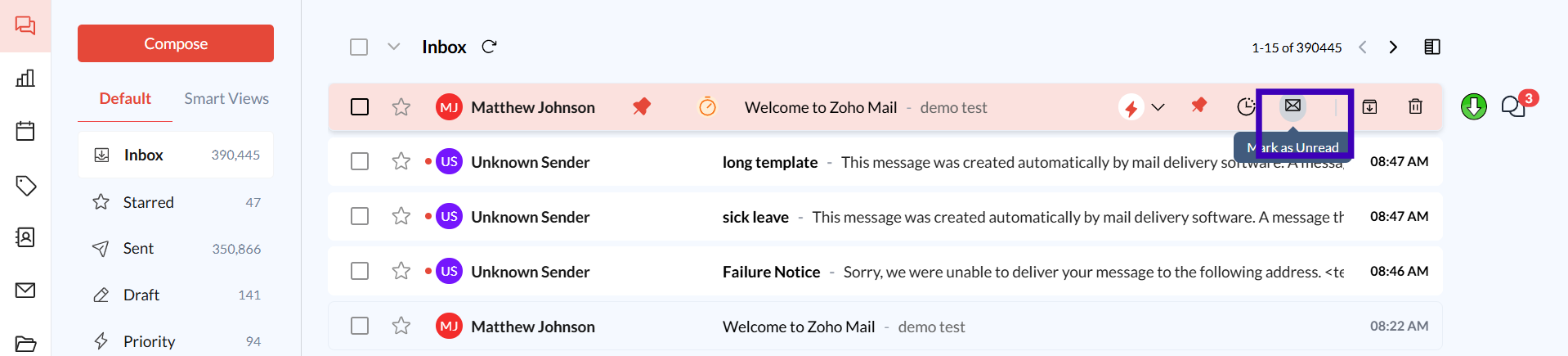
Locate the Email: In your inbox, find the email you want to mark as unread.
Hoover on the Email or Select Options: Look for options on the right side of the mail.
Choose “Mark as Unread”: This will set the email as unread, signaling that it still requires your attention.
Marking an Email as Read
Select the Unread Email: Find the unread email you want to mark as read.
Hoover on the Email or Select Options: Look for options on the right side of the mail.
Choose “Mark as Read”: This action updates the email status to read, clearing it from any “Unread” filters.

Bulk Marking Emails as Read or Unread
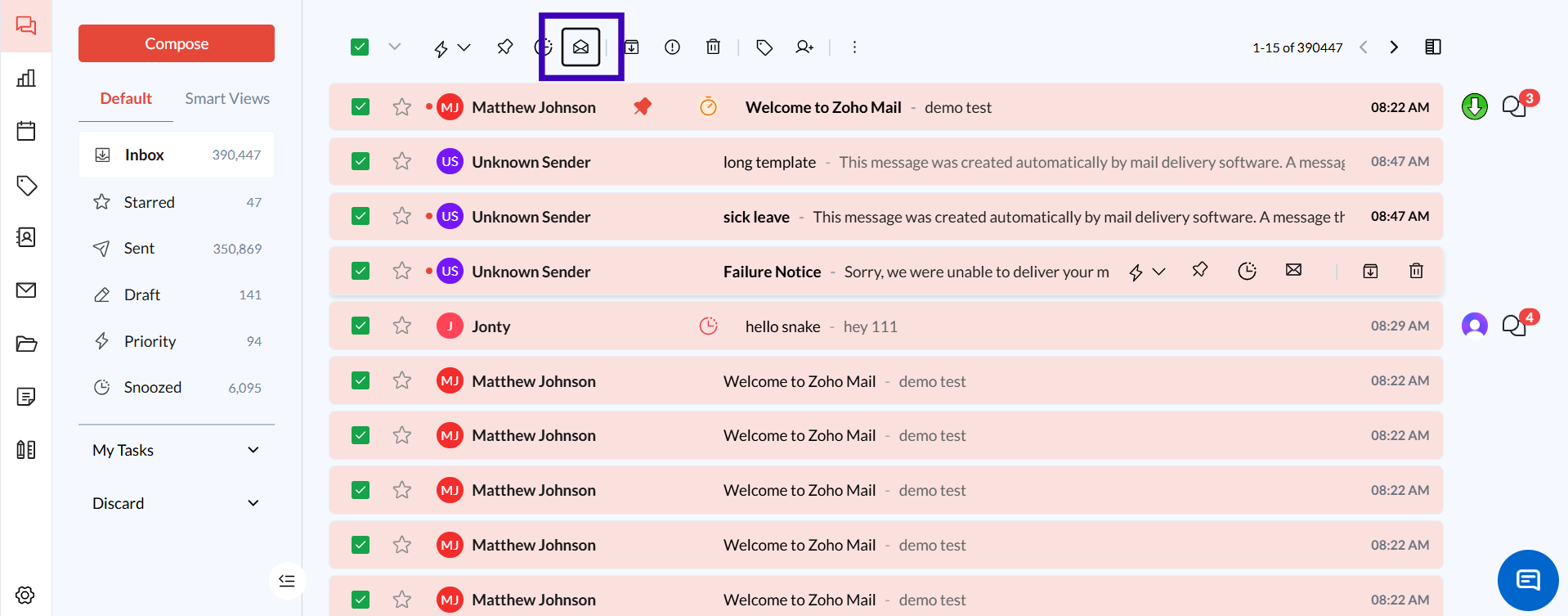
Select Multiple Emails: Use checkboxes or selection tools to choose multiple emails.
Choose “Mark as Read” or “Mark as Unread.” This option will apply the selected status to all highlighted emails.
Additional Tips and Best Practices
Use Unread Status for Follow-Ups: If an email requires further action, mark it as unread to remind yourself to address it later.
Filter by Unread Messages: Zeninbox allows you to filter your inbox to show only unread messages, making it easier to prioritize new or pending emails.
Common Issues and Troubleshooting
Q: My email automatically marks as read when I open it. Can I change this?
Solution: Check your Settings for options that control when an email is marked as read. You may be able to adjust it to only mark as read when you explicitly choose to.
Conclusion and Next Steps
The Read vs. Unread status feature in Zeninbox is a powerful tool to manage and organize your inbox efficiently. By marking emails appropriately, you can stay on top of important messages and ensure nothing slips through the cracks.