Real-time Collision Detection
Written By lucidgrowth
Last updated Over 1 year ago
Introduction
Real-time collision detection in Zeninbox is a feature designed to help teams avoid overlapping responses to the same email thread. It allows team members to see when someone else is replying to an email in real-time, preventing duplicate or conflicting communications. This ensures smooth coordination and enhances productivity by keeping everyone on the same page.
Key Features
Live Status Indicator: Shows which team member is currently drafting a reply to a specific email thread, updating in real-time.
Prevention of Duplicate Responses: Alerts other users to avoid writing a response if a team member is already handling the conversation.
Team Collaboration: Facilitates better coordination within teams by providing visibility into ongoing email activities.
Step-by-Step Guide
Step 1: Recognize Collision Alerts
When you open an email thread, Zeninbox will display a notification if another team member is currently replying to that email.
The alert will include the team member’s name and status, such as “John is currently replying to this thread.”
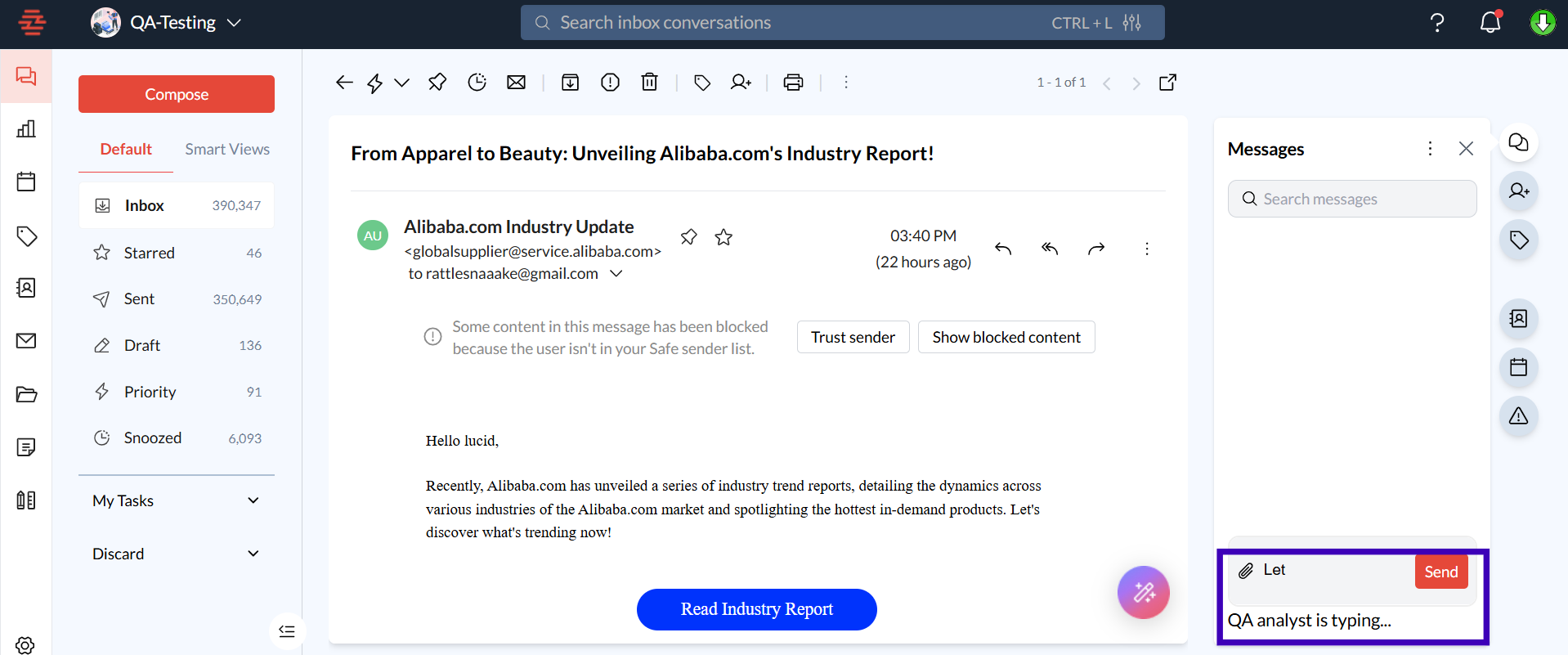
Step 2: Coordinate with Your Team
If you see a collision alert, you can either wait for the other team member to finish their response or collaborate directly using internal messaging to decide the best approach.
Use Zeninbox’s internal chat feature to communicate with team members directly if clarification is needed.
Common Issues/FAQs
Q1: What happens if multiple team members try to reply at the same time?
A: Zeninbox will show real-time alerts to all team members involved, indicating who is actively drafting a reply. This helps in coordinating responses effectively.
Conclusion
Real-time collision detection is a powerful tool for teams that want to maintain a smooth and coordinated communication process. It minimizes confusion, improves team collaboration, and ensures a more professional experience for clients. For further guidance on using this feature or other collaboration tools, visit our Help Center or contact our support team for personalized assistance.