How to Filter Messages Like These in Zeninbox
Learn how to use the "Filter Messages Like These" feature in Zeninbox to quickly find emails with similar senders, subjects, or attributes for easy organization.
Written By lucidgrowth
Last updated Over 1 year ago
Introduction
The Filter message like these feature in Zeninbox helps you find email threads that are related to the one you are currently viewing. This feature can save time and provide valuable context by gathering similar messages or topics in one place. Whether you're looking to review past discussions on the same topic or find related customer queries, this feature ensures you have the information you need.
Key Features
Contextual Email Retrieval: Automatically pulls up conversations with similar topics, keywords, or senders, making it easier to find related information.
Step-by-Step Guide
Step 1: Open a Conversation in Zeninbox
Log into your Zeninbox account and navigate to the email thread you wish to view.
Click on the thread to open the detailed view.
Step 2: Access the Similar Conversations Feature
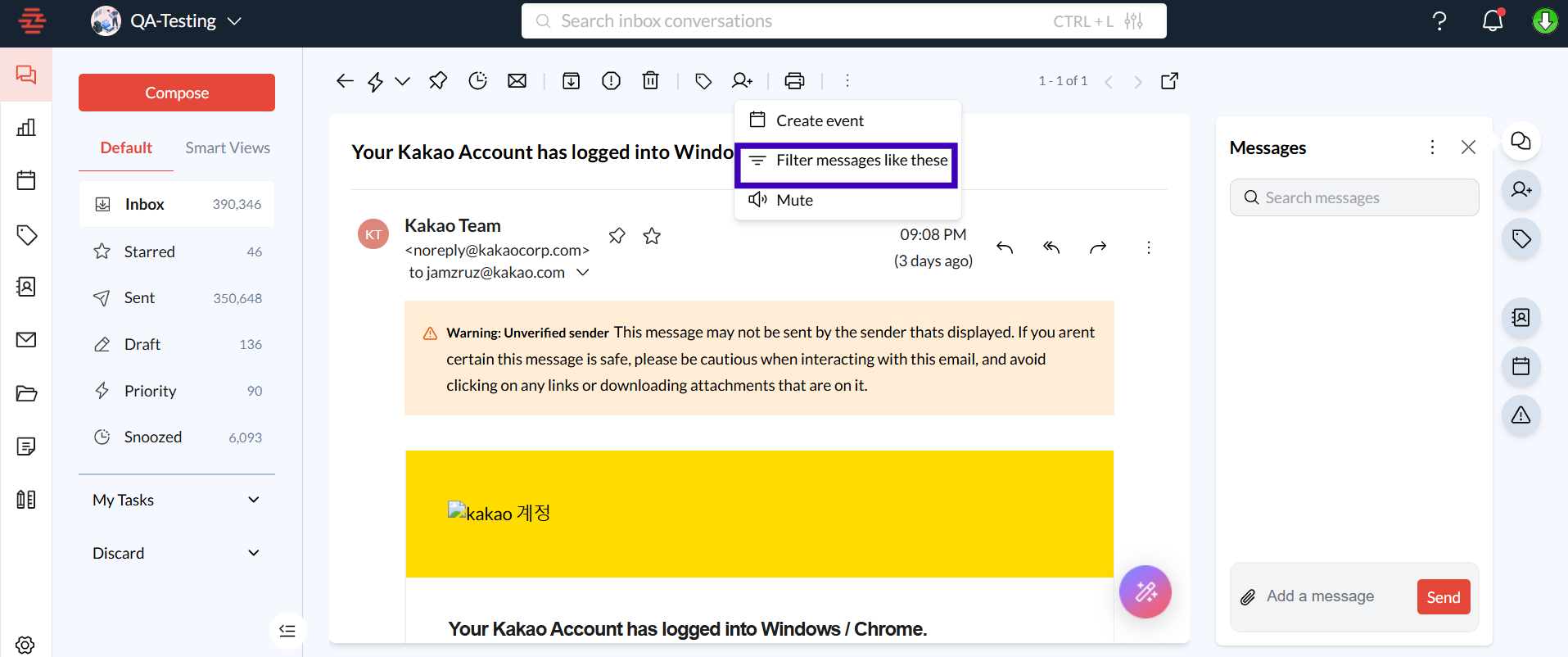
Within the email view, locate the filter message like these buttons on the top three dot options.
Click on this option to see a list of conversations that match the context of the current thread.
Conclusion
The View Similar Conversations feature is a powerful tool for finding related discussions and gaining context quickly. It enhances your ability to manage emails effectively, especially when dealing with complex topics or long-standing client interactions. For more details on this feature or other Zeninbox tools, explore our Help Center or reach out to our support team.