Unable to Upload Attachments: Solutions
Written By lucidgrowth
Last updated Over 1 year ago
Introduction
Are you having trouble uploading attachments in Zeninbox? This is a common issue that many users face and can be due to various reasons, such as file size limits, network issues, or browser settings. This article will guide you through potential solutions to help resolve the problem so you can attach files smoothly.
1. Check File Size Limits
Zeninbox has a maximum file size limit for attachments.
Make sure your attachment does not exceed the Maximum limit.
If your file is larger, consider compressing it into a ZIP file or using a file-sharing service and include the link in your email.
2. Verify Supported File Types
Zeninbox supports a range of file formats, such as PDF, DOCX, JPEG, PNG, etc.
If you are attempting to upload a file type that isn't supported, convert it to a supported format before uploading.
3. Check Browser Compatibility
Ensure you are using an up-to-date browser like Google Chrome, Mozilla Firefox, or Microsoft Edge.
Outdated browsers might have trouble handling file uploads.
Update your browser to the latest version or try using a different one.
4. Clear Browser Cache and Cookies
Cached data can sometimes cause upload issues.
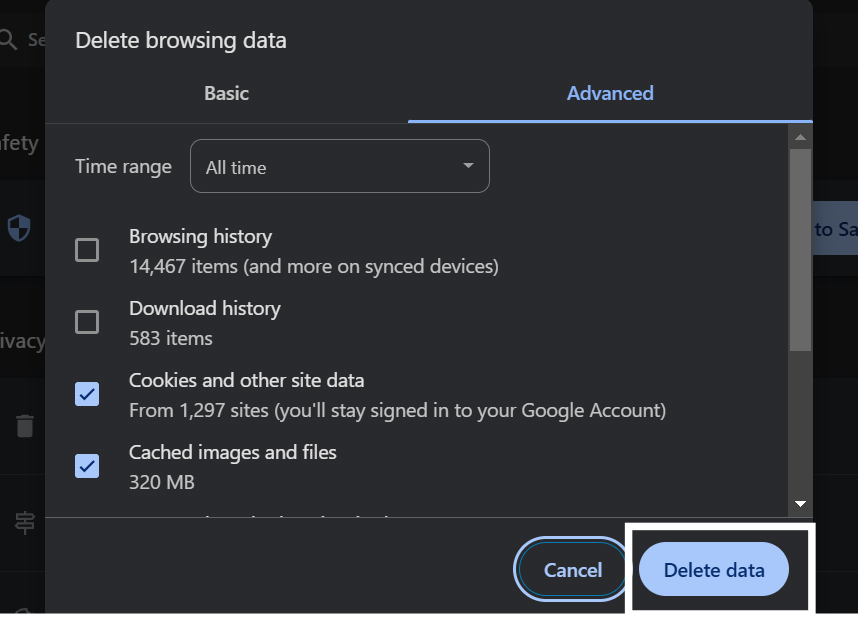
To clear cache and cookies, go to Settings > Privacy and Security > Clear Browsing Data in your browser.
Select Cookies and other site data and Cached images and files, then click Clear data.
Restart your browser and try uploading the attachment again.
5. Check Network Connectivity
A weak or unstable internet connection can cause upload interruptions.
Verify your connection speed and stability using an online speed test.
If you are on a slow connection, try uploading the file at a time when network traffic is lower.
Common Issues and Troubleshooting
Error: File Type Not Supported: Convert the file to a supported format like PDF before uploading.
Files Take Too Long to Upload: This might be due to slow internet speeds; try a different network or time of day.
Conclusion and Next Steps
By following these steps, you should be able to resolve most issues related to uploading attachments in Zeninbox. If the issue persists, it might be due to specific settings or restrictions.
We hope this guide helps you quickly get back to sharing your files! Happy emailing!