How to Connect Zoho Mail (Personal)
Written By lucidgrowth
Last updated About 1 year ago
Introduction
If you’re looking to connect your personal Zoho Mail account to Zeninbox, you’re in the right place! Many users integrate their Zoho Mail to manage emails in a single, efficient platform. This article will guide you through the steps required to connect your personal Zoho Mail account with Zeninbox seamlessly.
Prerequisites
Before proceeding, ensure that you have:
A Zeninbox account with permission to add mailboxes.
Access to your Zoho Mail account credentials.
IMAP is enabled in your Zoho Mail settings.
Note: Zeninbox only supports IMAP/SMTP for Zoho Mail integration. This guide is specifically for personal Zoho Mail accounts.
Step-by-Step Solution
Step 1: Access Mailbox Management in Zeninbox
Log in to your Zeninbox account.
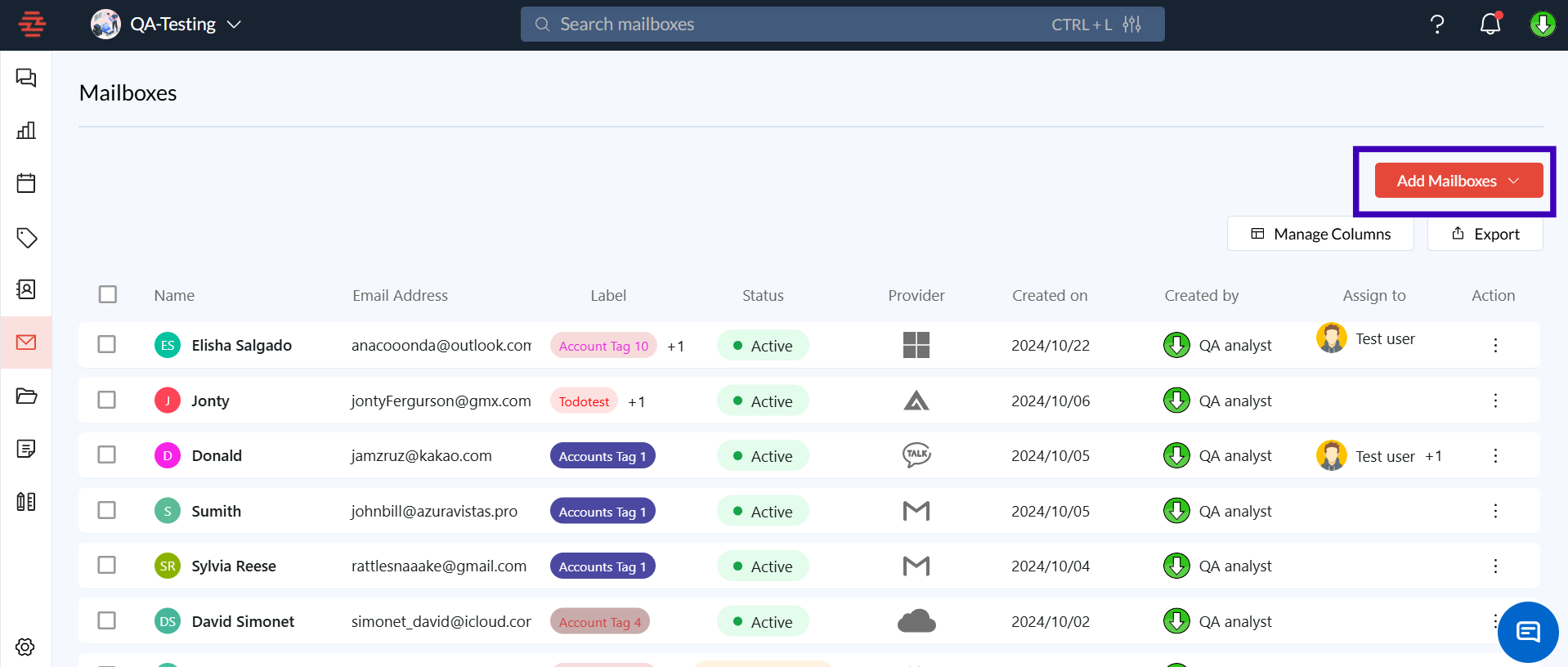
From the sidebar, click on the Mailboxes icon.
Click on Add Mailboxes and select Add Manually from the dropdown.
Step 2: Choose IMAP/SMTP Setup for Zoho
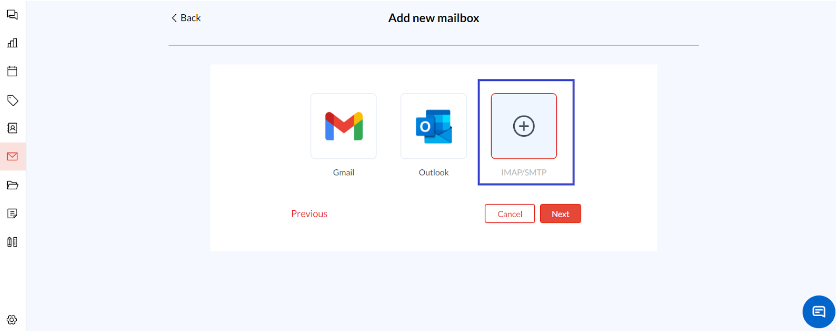
In the mailbox setup window, choose the IMAP/SMTP option to add Zoho Mail.
Click Next to proceed.
Step 3: Enter Your Zoho Mail Account Details
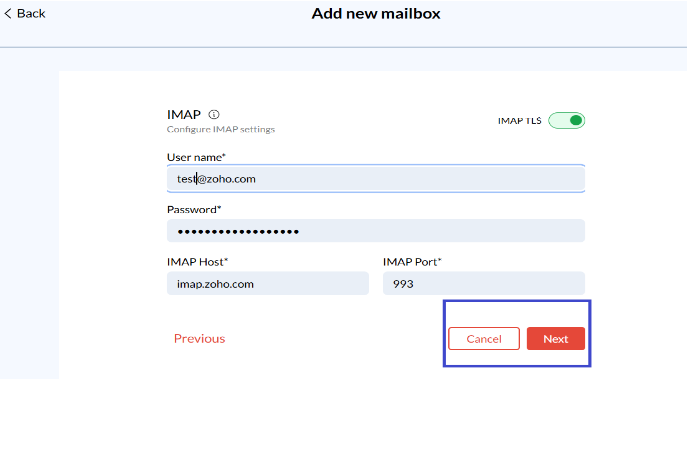
Fill in the following details in the setup fields:
IMAP Host: `imap.zoho.com`
IMAP Port: 993 (Use SSL encryption)
SMTP Host: `smtp.zoho.com`
SMTP Port: 465 (Use SSL encryption)
Enter your Zoho Mail email address and password in the required fields.
Click Next to save the settings.
Step 4: Generate an App-Specific Password (If Two-Factor Authentication is Enabled)
If Two-Factor Authentication is enabled on your Zoho Mail account:
Log in to Zoho Mail.
Go to My Account > Security > App Passwords.
Generate a new app-specific password for Zeninbox.
Use the app-specific password generated instead of your regular Zoho password during setup.
Step 5: Complete the Setup
After entering all details, click Next to verify the connection.
Once verified, you’ll see your Zoho Mail listed under connected mailboxes in Zeninbox.
Common Issues and Troubleshooting
Invalid Credentials Error: Verify that you are entering the correct email and password or app-specific password.
Connection Timeout: Check your internet connection and try reconnecting.
IMAP Disabled: Ensure IMAP is enabled in Zoho Mail settings.
Conclusion and Next Steps
By following this guide, you should now be able to successfully connect your Zoho Mail (personal) account to Zeninbox. For additional support, visit our Help Center or reach out to our support team.
If you have any more questions, don’t hesitate to contact us for further assistance!