Emails Not Sending: Common Causes and Fixes
Learn why emails may fail to send in Zeninbox and how to fix issues like server settings or authentication errors.
Written By lucidgrowth
Last updated Over 1 year ago
Introduction
Are you facing issues with emails not sending through Zeninbox? This problem can be frustrating, especially when important messages fail to reach their recipients. Common causes include network issues, incorrect SMTP settings, and email server problems. This article provides a detailed guide to troubleshooting and resolving these issues, ensuring your emails get delivered smoothly.
Prerequisites
Before you begin troubleshooting, make sure you have:
Correct SMTP Settings: Verify that the SMTP settings configured in Zeninbox match those provided by your email provider.
Important Note: If your organization uses IP allowlists or firewalls, ensure Zeninbox’s SMTP servers are allowed.
Step-by-Step Solution
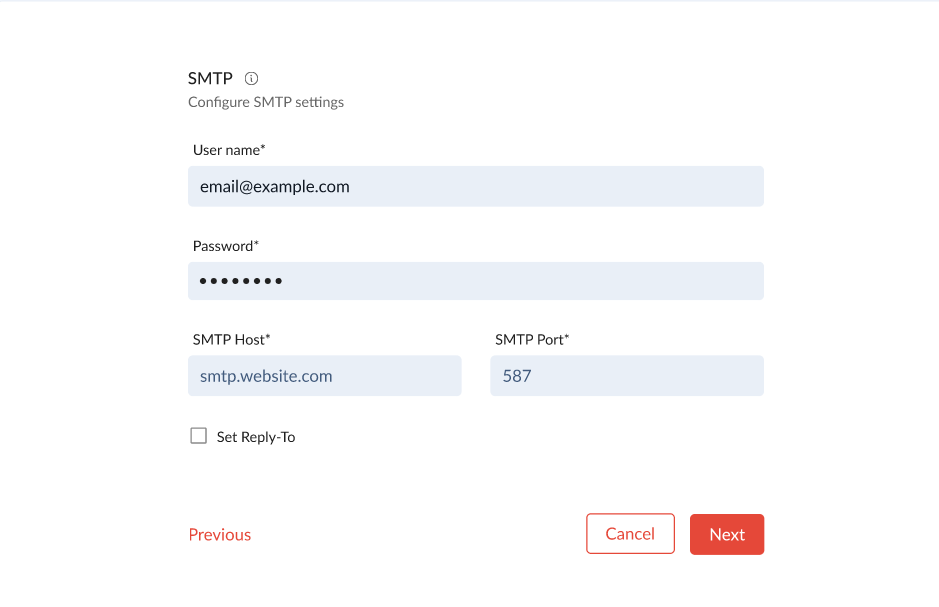
Step 1: Verify SMTP Server Settings
Go to Mailbox in Zeninbox.
Check that the SMTP server address, port number, and authentication method match those provided by your email service.
Ensure SSL/TLS settings are correctly configured.
Step 2: Check Internet Connectivity
Ensure you have a stable internet connection before sending emails.
If you’re using a VPN, try disconnecting and sending the email again.
Run a speed test to verify if your internet speed is sufficient.
Step 3: Confirm Recipient’s Email Address
Double-check that the recipient's email address is entered correctly.
A small typo can cause delivery failures.
Step 4: Clear Outbox or Drafts Folder
If emails are stuck in your Outbox or Drafts folder, try the following:
Open the email in the Outbox and click Resend.
If that doesn’t work, delete the email from the Outbox and create a new message.
Common Issues and Troubleshooting
Issue: “SMTP Authentication Failed”
Double-check the username and password for your SMTP server.
Make sure two-factor authentication (2FA) is not causing issues.
Problem: Emails Sending Slowly or Timing Out
This could be due to large attachments or a slow internet connection.
Reduce the size of your attachments and retry.
Conclusion and Next Steps
Most email-sending issues in Zeninbox can be resolved by checking SMTP settings, verifying network connectivity, and managing email limits. If these solutions don’t resolve the problem, it might be necessary to reach out for further support. For additional help, explore our related articles or contact Zeninbox Support.
If you need further assistance, feel free to contact our support team through the Help section on the Zeninbox website.